How To Easily Recover Hacked Facebook Account 2026

As everyone knows, recovering a hacked Facebook account can be a real pain. Facebook seems to have people running in circles before anything is remotely done. Some people even get caught in a loop of repeating the same tasks over and over with no results. This is a method to recover your account when stuck in the ID verification loop. This has worked for many and only requires the help of a friend or a VPN. This method is also for when the hacker has removed the original email and phone number.
Recovery Method
- Use a Different IP: The first part of the process that has worked for many is using a different IP address. This can be accomplished by asking a friend to start the process or changing your IP via a virtual private network (VPN).
- Use a New Email: When you get to the stage of recovery to upload an ID, use a friend’s email or one not associated with a Facebook account.
- Break Out of Recovery Loop: On the new email, you should receive an email from Facebook saying “Thank you for confirming your identity,” and provide you with a temporary password. After following the steps, you will be shown a link saying, “Get Back to the Account”. This time, you should be presented with a page that says “Secure your Login Details”.
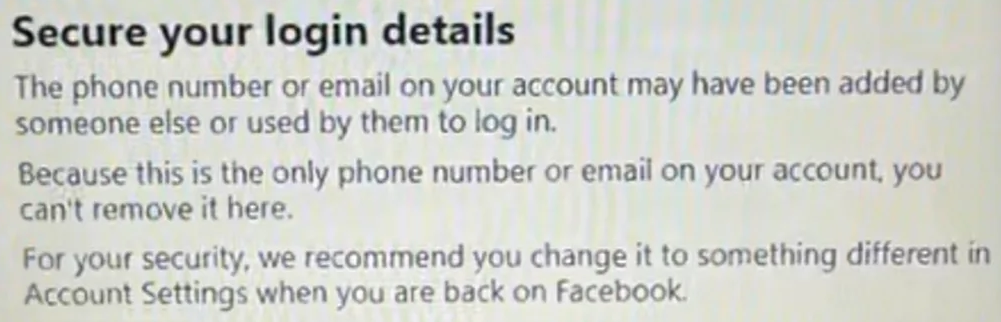
Secure Method:
- Restore Previous Phone Number: Following the page above, you will be presented with a page to add a phone number that was previously connected with that Facebook account. Facebook will then send a temporary code to access your account.
- Add New Email: Since the hacker has added their email, you won’t be able to delete it or reset the password without adding a new email. After adding a new email, you can have a reset link sent to it.
- Secure Account: After resetting the password, you can remove the hacker’s email. Following this, you should add your phone number and enable two-factor authentication to prevent this from happening again.
Hopefully this method works for you!